ICAO guide
ICAO compliant passport photo: size, rules and how to get one
Passport offices, visa portals and airport e-gates check your photo against ICAO Doc 9303. This guide gives you the exact size, every rule, the differences between countries and a simple way to check your photo before you submit it.
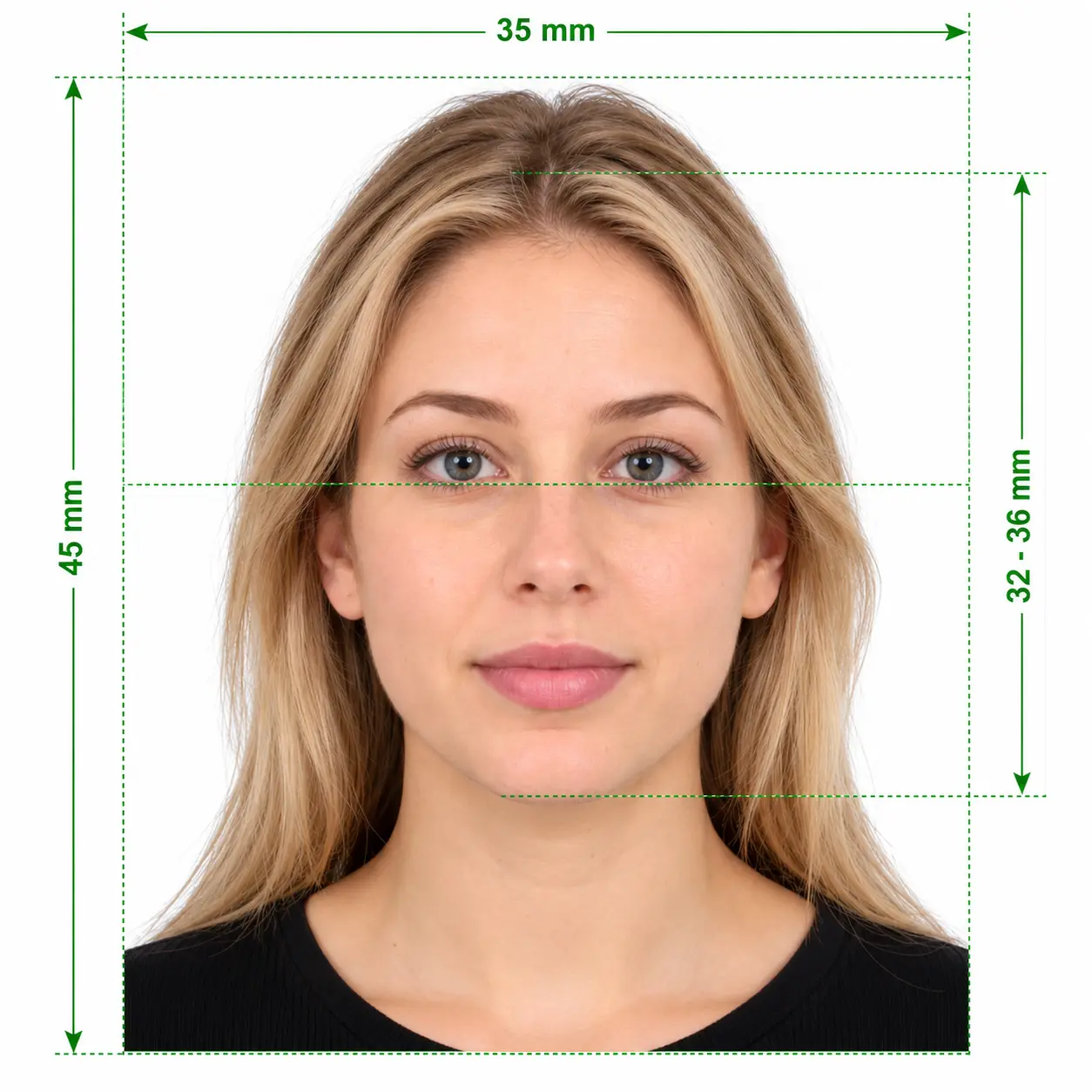
What is an ICAO compliant photo?
It’s a recent colour portrait, usually 35 × 45 mm, with your head 32–36 mm tall, a plain light background, even lighting, a neutral expression and both eyes open. Passport systems compare it with your live face, so even a small shadow or tilt can get it rejected.
ICAO standard photo size at a glance
These passport photo ICAO standards come from Doc 9303 and ISO/IEC 19794-5, the face image standard it references. Most countries use them as they are. A few change the photo size or head height, as the country table below shows.
- Photo size
- 35 × 45 mm (most countries)
- Head height
- 32–36 mm, chin to crown
- Face in frame
- 70–80% of the photo height
- Background
- Plain white, off-white or light grey
- Colour
- Full colour, natural skin tones
- Age of photo
- Taken in the last 6 months
- Print quality
- At least 300 dpi on photo paper
- Digital minimum
- 90 px or more between the eyes
ICAO standard photograph requirements
Every ICAO standard photograph must meet these six groups of rules. Officers check them by eye, and portals and e-gates check them with software.
Framing and head position
- Face the camera squarely with your head level and shoulders straight.
- Centre your face and leave a small gap above your hair.
- Show your full head from crown to chin, plus the top of your shoulders.
Expression and eyes
- Keep a neutral expression with your mouth closed.
- Open both eyes fully and look straight into the lens.
- Keep hair away from your eyes and eyebrows.
Lighting and background
- Light your face evenly, with no shadows on either side.
- Avoid flash glare, hot spots and red-eye.
- Use one plain background colour with no patterns, objects or other people.
Glasses
- Remove your glasses whenever you can. Many countries now require it.
- If you must wear them for medical reasons, avoid glare and tinted lenses.
- Make sure the frames never cover any part of your eyes.
Head coverings
- Wear one only for religious or medical reasons.
- Keep your face visible from the bottom of the chin to the top of the forehead.
- Make sure the covering casts no shadow on your face.
Image quality
- Submit a sharp photo with no blur, grain or pixelation.
- Never use filters, beauty modes or retouching that changes your face.
- Don't scan or photograph an old printed photo.
Photographing a baby? Most countries relax the expression and open-eye rules for children under one. Lay the baby on a plain white sheet, and keep hands, toys and dummies out of the frame.
Your photo passes when it has
- Recent colour photo, taken in the last 6 months
- Plain light background, evenly lit
- Head straight, centred and 32–36 mm tall
- Neutral face, mouth closed, eyes open
- Sharp focus and true skin tones
Your photo fails when it has
- Shadows on the face or behind the head
- Smiling with teeth or raised eyebrows
- Tinted lenses, glare or hair over the eyes
- Selfie-arm distortion or a tilted head
- Filters, background blur or beauty effects
ICAO photo sizes by country
The ICAO foto standard sets the shared rules, and each country picks its own size. Here are the most requested documents.
| Document | Photo size | Head height | Watch out for |
|---|---|---|---|
| United States passport | 2 × 2 in (51 × 51 mm) | 25–35 mm | White background, no glasses |
| United Kingdom passport | 35 × 45 mm | 29–34 mm | Plain cream or light grey background |
| Schengen visa | 35 × 45 mm | 32–36 mm | Plain light background |
| India passport (online) | 630 × 810 px | Face fills 80–85% | White background, JPEG up to 250 KB |
| Canada passport | 50 × 70 mm | 31–36 mm | Studio name and date on the back |
| Australia passport | 35–40 × 45–50 mm | 32–36 mm | Plain light background |
| China visa | 33 × 48 mm | 28–33 mm | White background, ears visible |
Governments update these rules from time to time. Confirm the current size with the issuing office before you print.
How to make an ICAO standard photo at home
You don’t need a studio. A phone, a plain wall and daylight give you everything an ICAO compliant photo needs.
- 1
Find a plain wall and soft light
Stand about 50 cm in front of a plain white or light grey wall. Face a window during the day so daylight falls evenly on your face.
- 2
Set up the camera at eye level
Ask someone to hold the phone 1–2 m away at your eye level. Use the main rear camera, because a close selfie stretches your nose and shrinks your ears.
- 3
Pose and take several shots
Square your shoulders, relax your face and look into the lens. Take five or six photos and keep the sharpest one.
- 4
Crop, check and fix the background
Crop to your document's size so your head is the right height, then replace any uneven background with plain white. Our tool does all of this for you.
- 5
Download, upload or print
Upload the digital file to your passport or visa portal, or print the 4 × 6 in sheet at any photo lab and cut out each photo.
How to run an ICAO photo check before you submit
Portals reject photos automatically, and each rejection costs you time. Run these five checks first.
Check 1
Measure the head height
On a 35 × 45 mm photo, measure from the bottom of the chin to the top of the head. You need 32–36 mm. On a digital file, the head should fill 70–80% of the image height.
Check 2
Check that the eyes are level
Draw an imaginary line through both pupils. It should run straight across, with both eyes the same distance from the edges.
Check 3
Zoom in to 100%
Look for blur around the eyes, grain in dark areas and a halo where a background tool cut around your hair.
Check 4
Scan the background edges
Check the corners and the area behind your shoulders for shadows, gradients or a coloured tint.
Check 5
Confirm the file details
Compare the format, pixel dimensions and file size with the limits on the portal. A perfect photo still fails if the file is too large.
- Check my photo
Skip the ruler
Our tool measures head height, eye position, top margin, background and file details for you, and shows the results before you pay.
Did a portal say your photo does not comply with ICAO standards?
Our guide explains each cause of the rejection and shows you how to fix it. Read the rejection guide
Free ICAO photo converters vs a checked photo
A free ICAO standards photo converter crops your image to size, but cropping alone doesn’t make a photo compliant. Here’s how the options compare.
| Feature | Free cropping tool | Photo studio | ICAO Standard Photo |
|---|---|---|---|
| Crops to your country's size | Yes | Yes | Yes |
| Replaces the background with plain white | Sometimes | Yes | Yes |
| Measures head height and eye position | Rarely | By eye | Yes, automatically |
| Shows check results before you pay | No check | No | Yes |
| Refund if an agency rejects the photo | No | Varies | Yes, claim within 3 days |
ICAO compliant photo FAQ
- What is an ICAO compliant passport photo?
- An ICAO compliant passport photo follows ICAO Doc 9303, the standard the International Civil Aviation Organization sets for machine-readable passports. It defines the photo size, head position, background, lighting and expression, so automated gates and officers can match the photo to your face. Some offices call it an ICAO standard photograph or a biometric photo.
- What is the ICAO standard photo size?
- Most countries use 35 × 45 mm with the head 32–36 mm tall from chin to crown. The United States uses 2 × 2 in (51 × 51 mm), and Canada uses 50 × 70 mm. Online portals set their own pixel sizes, such as 630 × 810 px for Indian passport applications.
- Is an ICAO compliant photo the same in every country?
- The core rules are the same everywhere: a plain background, even lighting, a neutral face and open eyes. Each country then adds its own photo size, head height, background colour and glasses rule. Always choose the exact document you are applying for.
- How can I run an ICAO photo check on my photo?
- Measure the head height, confirm your eyes are level, zoom in to check sharpness, scan the background for shadows and compare the file details with the portal's limits. Our tool runs these checks automatically and shows the results before you pay.
- What should I do if my photo does not comply with ICAO standards?
- Find out which rule it breaks. You can fix background, crop, size and file format problems from the same photo, but you need a new photo for shadows, a tilted head, glare, blur or the wrong expression. Our guide to the “photo is not valid as per ICAO standard” error covers each cause.
- Is there a free ICAO standards photo converter?
- Yes, several free converters crop and resize a photo, but most don't check head height, eye position or lighting, so the result can still fail. With our tool, you upload your photo and see the check results for free, and you pay $7.99 only when you download.
- Can I make an ICAO standard photo with my phone?
- Yes. Any recent phone takes a sharp enough photo. Ask someone to hold it at eye level 1–2 m away, stand in front of a plain wall facing a window, and then crop and check the photo before you use it.
- Can I wear glasses in an ICAO standard photograph?
- Remove them if you can. The United States and several other countries reject photos with glasses. Where glasses are allowed, the lenses must be clear with no glare, and the frames must not cover your eyes.
- Can I smile in an ICAO photo?
- No. Keep a neutral expression with your mouth closed. A smile changes the shape of your face and can cause face-matching software to fail.
- Is an ICAO compliant photo mandatory for Indian passport applications?
- Yes. Since 1 December 2025, Indian missions abroad require an ICAO compliant photo with every passport application on Global Passport Seva 2.0. The upload must be a 630 × 810 px JPEG of up to 250 KB on a white background.
- What does “ICAO foto standard” mean?
- It means the same thing as the ICAO photo standard. “Foto” is the spelling in German, Dutch, Spanish and several other languages, and the Doc 9303 rules don't change with the language.
- How long is an ICAO photo valid?
- Most passport offices accept a photo taken within the last 6 months. Take a new one sooner if your appearance changes, for example after shaving a beard or changing your hairstyle significantly.
Get an ICAO compliant passport photo in minutes
Upload a phone photo, see the check results for free and pay $7.99 only when you download.