ICAO Standard Photo

ICAO guide · Visual examples

What is an ICAO standard photo? Acceptable vs rejected examples

See exact sample proportions, biometric framing lines, and side-by-side acceptable vs rejected photo examples under ICAO Doc 9303 so you know what passes before you upload.

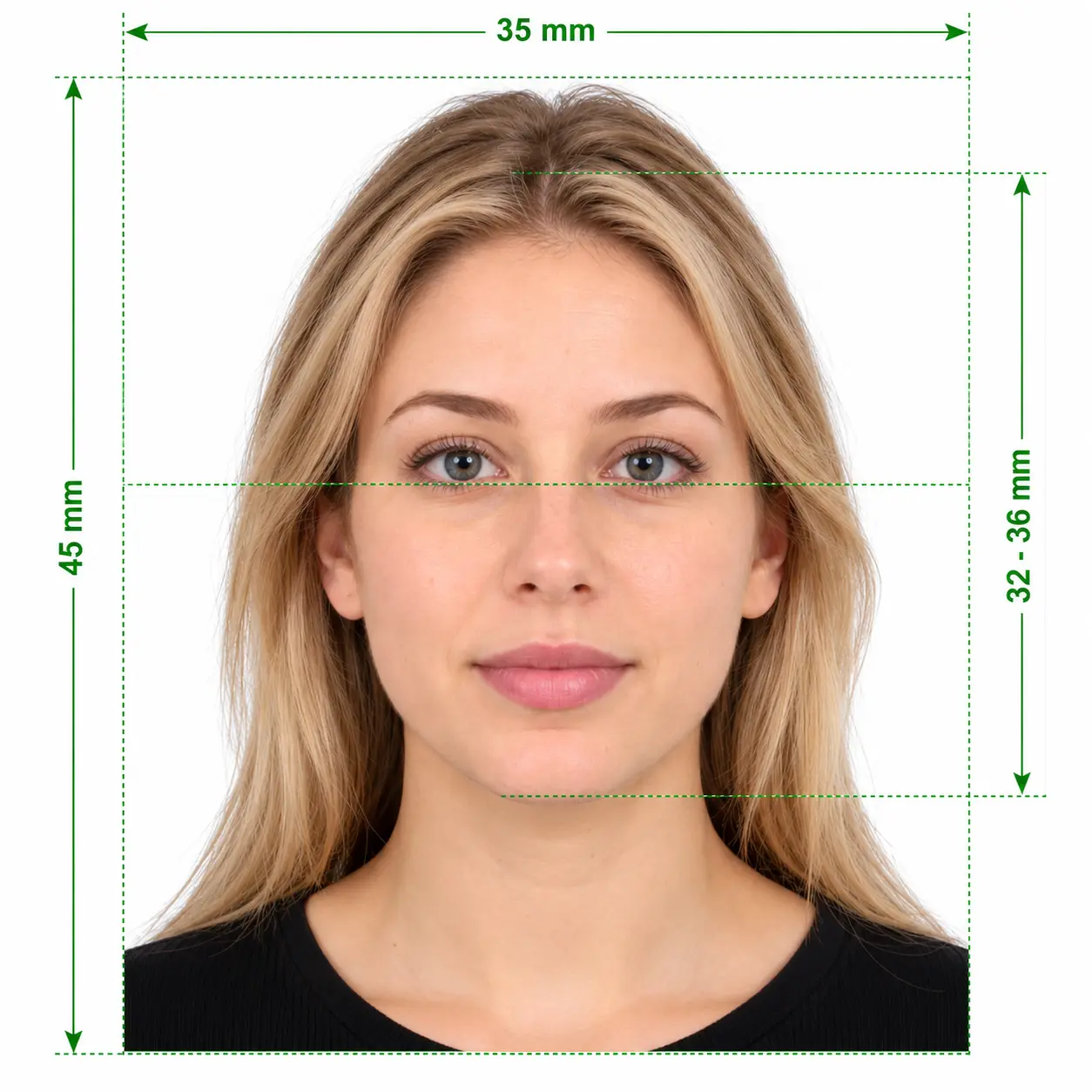
Sample acceptable ICAO standard passport photograph with neutral expression and plain white background
Acceptable ICAO standard photo sample: straight gaze, even light, plain white background.

What is ICAO standard for a photo?

Set by the International Civil Aviation Organization in ICAO Doc 9303, an ICAO standard photo is a sharp, unfiltered colour portrait facing straight into the camera on a plain white or light background, with a neutral mouth-closed expression and the head occupying 70–85% of the frame height.

ICAO Doc 9303 Geometry (35 × 45 mm)

Top gap 2–4 mm32–36 mm(70–80%)Width: 35 mm (630 px India)Height: 45 mm (810 px India)Green band: ideal eye-line zone

Core ICAO photo specifications

Every machine-readable passport uses these baseline numbers so border e-gates can align your eyes and measure facial landmarks accurately.

Standard
ICAO Doc 9303 (MRTD)
Standard print size
35 × 45 mm (2 × 2 in US)
Head height
32–36 mm (70–80% of frame)
India online size
630 × 810 px (80–85% face)
Background
Plain white or light grey
Eye distance
At least 90 px between pupils
Expression
Neutral, mouth closed, eyes open
Print / file tone
Continuous-tone, no filters

Acceptable vs rejected ICAO photo examples

Compare each rule side by side. Even if your background is white, failing any single check below causes a portal rejection.

1. Head size & framing

Pass

Accepted: 70–85% head coverage

Full head from chin to hair plus top of shoulders centred, with a small 2–4 mm margin above the hair.

Fail

Rejected: Too small, too close or cut off

Waist-up shots, tight crops cutting off the top of hair or chin, or excessive blank wall above the head.

2. Head tilt & posture

Pass

Accepted: Straight & level eyes

Nose aligned with the vertical centreline, both ears equally visible, and shoulders square to the lens.

Fail

Rejected: Tilted or turned

Even a 5° sideways head tilt or turned shoulders triggers “Posture check failed” on Passport Seva.

3. Background & shadows

Pass

Accepted: Plain uniform white

Clean white or light neutral background with zero wall shadows, furniture, doors or colour gradients.

Fail

Rejected: Wall shadow or pattern

Standing flush against a wall casts a dark outline behind your head. Cream, blue or textured walls fail.

4. Facial lighting & flash

Pass

Accepted: Even daylight on both sides

Face illuminated evenly from front window light with natural skin tone, no hot spots and no dark eye sockets.

Fail

Rejected: Half-face shadow or red-eye

Overhead ceiling bulbs or side lamps darken one cheek and under the chin; direct flash causes red-eye.

5. Facial expression

Pass

Accepted: Neutral, mouth closed

Relaxed jaw, lips gently closed, eyebrows natural and both eyes open looking straight into the lens.

Fail

Rejected: Smiling or open mouth

Showing teeth, grinning, squinting, raised eyebrows or looking off-camera breaks biometric matching.

6. Eyeglasses & glare

Pass

Accepted: No glasses worn

Taking glasses off completely guarantees zero lens reflection, tint issues or frames crossing the eye line.

Fail

Rejected: Glare, tint or thick frames

White screen/flash reflections on lenses, photochromic tint or frames covering eyelids fail automated checks.

7. Hair & religious headwear

Pass

Accepted: Full face unobstructed

Hair tucked behind ears/away from eyebrows; turbans or hijabs allowed for religious reasons if chin-to-forehead is clear.

Fail

Rejected: Hair over eyes or fashion hat

Bangs covering eyebrows/eyes, caps, sunglasses on the head or scarves casting a shadow across the forehead.

8. Sharpness & digital editing

Pass

Accepted: Sharp continuous-tone photo

Crisp focus around eyelashes and iris, natural skin pores intact, exported as a clean high-quality JPEG.

Fail

Rejected: Filters, blur or WhatsApp compression

Portrait-mode background blur, AI beauty smoothing, pixelation or photographing an older printed ID photo.

Taking a baby or toddler photo? Infants have separate exceptions for closed eyes and expressions — see our acceptable vs rejected infant passport photo guide.

ICAO photo standards & examples FAQ

What is an ICAO standard photo?
An ICAO standard photo is a biometric passport or visa photograph that follows International Civil Aviation Organization (ICAO) Document 9303. It specifies a front-facing, neutral portrait on a plain light background with strict head-to-frame proportions so border control software can verify your identity accurately.
What does a real ICAO compliant photo look like?
It shows a crisp, evenly lit colour portrait from the top of your shoulders to just above your hair, against a solid white or light neutral background. Your head is level, centred, takes up 70–80% of the vertical height (80–85% for India Passport Seva), mouth closed, eyes open, and free of shadows or glasses glare.
Why do different countries call it ICAO foto, fototessera ICAO, or biyometrik fotoğraf?
All of those terms refer to the same ICAO Doc 9303 biometric photo specification used globally for e-passports and visas, including Schengen, Italian (fototessera formato ICAO), Spanish (formato ICAO), Turkish (biyometrik fotoğraf), and Indian Passport Seva applications.
Are minor smiles or tilted heads ever acceptable in an ICAO example?
No. Automated ICAO validators reject visible teeth, open mouths, raised eyebrows, and even minor sideways head tilts because facial recognition measures fixed distances between your pupils, nose bridge, and mouth corners.
Can I see if my own photo matches the acceptable example?
Yes. Upload your photo to our free ICAO Photo Checker to see your exact head height, eye position, top margin, and background test results before paying anything.
Test your own photo against ICAO examples

Upload your picture to check head height, eye line, background, and pixel dimensions for free before you pay.

Check & fix my photo